NOTE: You are NOT required to open a dollar account to be able to withdraw your money from AlertPay.
There are two confirmed ways to withdraw your AlertPay Funds, one is through BankWire and the other is through Credit or Debit Card.
Please make sure that you have already added your EON Debit Card to your AlertPay account, and that your account is already verified.
The process of withdrawal in AlertPay using Unionbank EON takes a maximum of 8 business days. You must withdraw at least $10 and utmost $500. A fee of $5 will be charged to your requested amount. Take for example, you request withdrawal for $100, you will receive a net of $95.
Step 1. Log in to your AlertPay account and select "Withdraw".
Step 2. Select the “Credit Card” option and fill in the necessary fields when prompted.
NOTE: You will receive an automated confirmation letter to your email account concerning your request. It will take a maximum of 4 business days to be processed.
After the 4-day period has elapsed you will receive another confirmation letter regarding the completion of your request and you will have to wait another 4 business days before the money will arrive to your Unionbank EON cyber account.
Step 3. Log-in to your Unionbank EON cyber account and check your transaction details.
NOTE: In case your AlertPay account is unverified and it’s your first time to add the EON Debit Card to your AlertPay account, you must add the EON Debit Card first, complete all the necessary details and ask for withdrawal. You can perform this method simultaneously.
Ask for withdrawal, $10 is the minimum amount, select USD for currency. Select the Unionbank EON card and fill the necessary fields to complete the transaction.
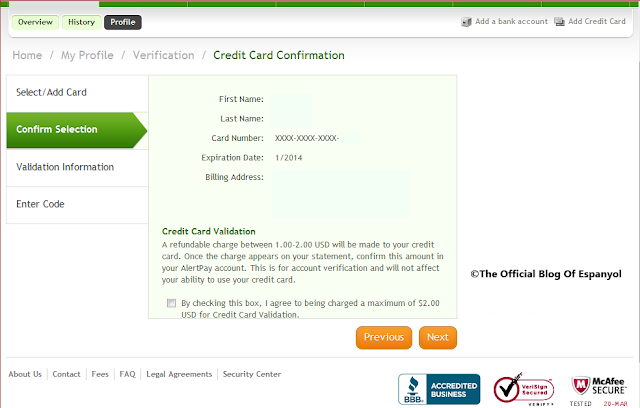
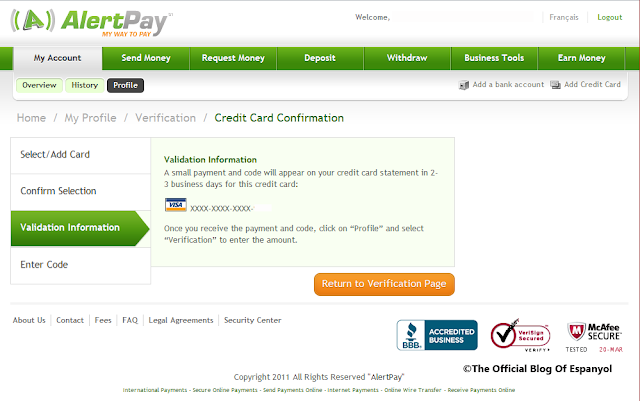
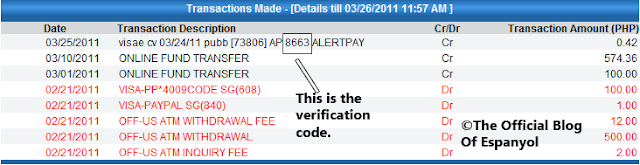
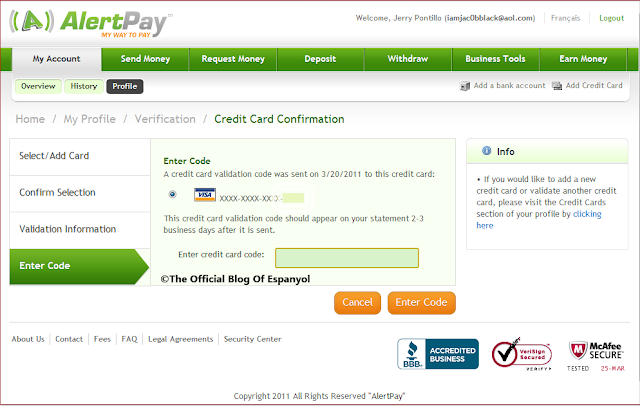
After 4 days, you will receive a 4-digit PIN or an Alertpay Verification Code to verify the card. Log-in to your Unionbank EON cyber account and check your transaction details.
Once the card has been verified you will wait for another 4 days for the withdrawal transaction and you will receive your money to your EON Debit Card without any hassle. Withdrawal to debit card only charges $5 fee, so it is more economical compared to the bankwire method.
Note, that once your card has been verified by AlertPay, you will not need another verification.
There are two confirmed ways to withdraw your AlertPay Funds, one is through BankWire and the other is through Credit or Debit Card.
Please make sure that you have already added your EON Debit Card to your AlertPay account, and that your account is already verified.
The process of withdrawal in AlertPay using Unionbank EON takes a maximum of 8 business days. You must withdraw at least $10 and utmost $500. A fee of $5 will be charged to your requested amount. Take for example, you request withdrawal for $100, you will receive a net of $95.
Step 1. Log in to your AlertPay account and select "Withdraw".
Step 2. Select the “Credit Card” option and fill in the necessary fields when prompted.
NOTE: You will receive an automated confirmation letter to your email account concerning your request. It will take a maximum of 4 business days to be processed.
After the 4-day period has elapsed you will receive another confirmation letter regarding the completion of your request and you will have to wait another 4 business days before the money will arrive to your Unionbank EON cyber account.
 |
| How To Withdraw AlertPay Funds To Unonbank EON |
NOTE: In case your AlertPay account is unverified and it’s your first time to add the EON Debit Card to your AlertPay account, you must add the EON Debit Card first, complete all the necessary details and ask for withdrawal. You can perform this method simultaneously.
Ask for withdrawal, $10 is the minimum amount, select USD for currency. Select the Unionbank EON card and fill the necessary fields to complete the transaction.
After 4 days, you will receive a 4-digit PIN or an Alertpay Verification Code to verify the card. Log-in to your Unionbank EON cyber account and check your transaction details.
Once the card has been verified you will wait for another 4 days for the withdrawal transaction and you will receive your money to your EON Debit Card without any hassle. Withdrawal to debit card only charges $5 fee, so it is more economical compared to the bankwire method.
Note, that once your card has been verified by AlertPay, you will not need another verification.