5 Facebook Marketing Secrets Revealed - Social Networking Tips


facebook-marketing-secrets-success

Facebook Marketing is so popular because of all social media platforms here on the Internet, Facebook has the highest active user count with over 750 million active users. YouTube comes in second place with over 490 million active users and Twitter comes in third with over 175 million active users.

Currently these three platforms rule the world of social media, we’ll see where Google+ ranks among the top three once it’s released. In this article I’m going to reveal 5 Facebook Marketing Secrets that you can implement immediately into your marketing strategy, so lets begin.

Facebook Marketing Secret # 1:

If you’re planning on marketing through Facebook it is important that you create an attractive and compelling profile page. If you’re marketing yourself as a business professional you want to upload business professional pictures to your profile page. You want to create a group using your name in the title, create a Facebook Fan page, and begin adding about 25 targeted friends per day to avoid getting banned from Facebook.

Facebook Marketing Secret # 2:

When building relationships on Facebook look for things that you have in common with other community members by reviewing their profile. Ask the right questions, show interest in what other have to say and most important.

Facebook Marketing Secret # 3:


If you’re in network marketing you’re going to want to join Fan pages of the industry guru’s, other Network Marketing Groups, Make Money Online Groups, Work From Home Groups, etc. These are the forums that you will market to on a regular basis.

Here’s an valuable rule of thumb: DO NOT pitch your business on the front end in these Facebook Groups and Fan pages, lead with value instead.

For Instance: You DO NOT want to post links leading directly to your business opportunity with a line stating “Want to make more money NOW? Click Here: http://www.yourlink.com”.

Facebook Marketing Secret # 4:


PROVIDE VALUE to the community.

Note: If you add value to someone’s life there is a HIGH chance that they will like you.

Providing great value will create DIE HARD Facebook followers, these followers will eventually buy from you or join you in business.

Facebook Marketing Secret # 5:

TAKE MASSIVE ACTION!! Consistent daily action produces the best results in the Facebook Marketing niche. Create a daily action plan and stay consistent for 90 days.


Source: http://www.ulyssesspellman.com/network-marketing-tips-5-facebook-marketing-secrets/

Tips And Features of Facebook Timeline Fan Pages


Facebook Fan Pages are already updated to the new Timeline profile.
Since March 30, 2012 all Facebook Pages are published with the new Timeline format.

To know more about the new Facebook Timeline format and how to use it for user profiles, see here the Facebook Timeline Complete Guide
Brand Pages will function in a similar way, as Facebook wants a more unified look and feel for the site. Ah, and of course more add spacethey can sell :)
So, what are the main changes for these pages that you need to look out for:

(This is my newly published Sociable and Nice Facebook Page)

1. Cover Photo
The main trademark of the new Timeline is that big Cover Image sitting on top of your profile, and now on top of your Facebook fan page. This can be an opportunity to create a stronger visual impact for your visitors.
There are some restrictions though, as Facebook doesn’t want your cover to resemble an add, your Brand Page Cover photo can not contain:
  • Any price or purchase information like “Free booze
  • Any contact information (e-mail, phone, website, social media links)
  • Calls to action like “Buy this now“, “Get it for free“, “Go shoot yourself
  • Any references to Facebook features like “Like our Page” or any arrows or signs pointing to any similar feature, like your old custom frame (if you had one)
  • Copyrighted material (of other people of course)
The same as for profiles, the pages cover photo will have a 851 x 315 pixels size. More details, samples and a template to download can be found here: Facebook Timeline Cover Photo Guide

2. Profile Picture
As before you can now add a Profile Picture for your Facebook Page. The new size is 180 x 180 pixels but also take into consideration that the thumbnail size will be 32 x 32 pixels.

3. Photos, Likes and Applications
Right under the cover image you can now find a series of boxes with the photos, likes to your page and the installed Facebook applications. One of the main features of the old page layout was the custom landing tab. That used to be the first thing a visitor would have seen on your page.
Sadly now this feature has been removed. The old tab can be found in the application boxes but the only way to direct visitors to it is trough a post on your page timeline.
A higher importance is now given to the thumbnail image of the installed applications as you may see on the bottom of the screen shot.
The good thing here is that you may change these thumbnails with a picture of your choice. To do that, go to the administration section of the page, choose “Apps” -> “Edit Settings” -> next to “Custom Tab Image” click on “Change“. The dimensions of these images are 111 x 74 pixels.
As you may see here, my old “Sociable and Nice” custom tab is under the top right logo.
You can also order the applications as you see fit, displaying your most important ones first.

4. Messages
This is a complete new feature and one that was requested by a lot of people. Exactly on top of the applications box there is a “Message” button. Now the visitors may contact the page admins by sending them a private message.
But if you don’t want to be contacted by your fans, you can choose to disable this feature, go to the Administration Panel, select “Manage” -> “Edit Page” -> “Manage Permissions” and than uncheck the field “Messages“.
5. Pin you favourite post
Another new feature that will allow you to pin (anchor) a selected story to the top of your page timeline for as long as 7 days. This will allow you to highlight specific content for a higher visibility.
A suggestion would be to use this functionality to link to one of those custom tabs you might have.

6. Admin panel
A new administration panel appears now at the top of the Facebook Pages that you manage. This is a big improvement on the old admin features and it helps you handle thing faster and more efficiently.
Also here you can find several Help Center items including another long desired and requested feature, “Change Your Fan Page Name“. All you have to do is go to this link.

7. Activity Log
In kinda the same way you do with profiles, you can also use the Activity Log to better manage your posts. You can reach it by going to the administration section, then click on “Manage” -> “Use Activity Log“.
Make sure you edit your Timeline right and allow only the posts that you want your visitors to see.

8. Activating Facebook Timeline for Brand Pages
Go to any of the pages you admin and you will see a warning and a preview button:
Or you can go to the official Facebook Pages section and click on the “Preview Your Pages” button.
An official pdf guide can be found here: Facebook Pages Product Guide

Some of the big brands have already started to publish their new timeline pages:
Coca Cola:

Starbucks:

Coldplay:


Source: http://www.vectorash.ro/facebook-timeline-brand-pages/


Here is a short Youtube Video outlining the features of a Timeline Fan Page

Get More Referrals Using Paid Ads Sulit.com.ph


For those people who want to have more referrals, pay a small amount at Sulit.com.ph. I sponsored a lot of people using this strategy. A lot of my members came from sulit paid ads and facebook.

Huwag lang manghinayang magbayad because sa business, owners pay in ads sa TV which cost million per second but they dont look at the price. Instead, they look at the return (ROI). Look at this as investment. Ang tignan nyo ay 'yung balik.

Actually 'yung mga napamember ko sa USA , UAE, QATAR, SAUDI, DUBAI, etc. galing po sa Sulit and alam ko most of people who will read this tutorial under my team and direct ko mismo, sa sulit nyo nalaman ang TNMM and ung iba sa facebook of which I have tutorials also how to use facebook as additional ads.

JUST FOLLOW THESE SIMPLE STEPS:

1. First buy Sulit Gold at least 1400 (This ad is good for 30 days)

1 SG = 1 Php so 1400 SG = 1400 Php now sa mga kaya then buy it sa mga di kya try to find a team mate who is willing to share 2 to 3 persons hati kyo sa payment hati hati din kyo sa tao.

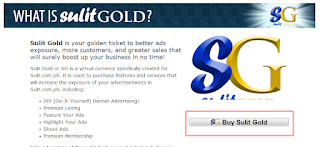
BUY SULIT GOLD --- click here

2. Then click Buy Sulit Gold


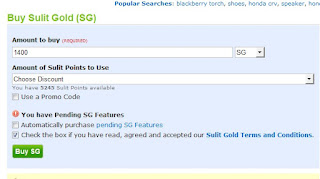
3.  Put 1400 on amount to buy and check the box (just follow the photo)

Note: The next time you buy you can use a promo code emailed to you by Sulit, so you will have a discount the next time you avail. I was able to get it 50% off last November.

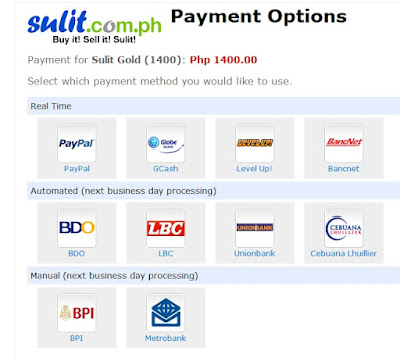
4. You could pay through the following options follow the instructions given to you by sulit to verify your payment.

5. After paying, your Sulit gold will be available. It's now time to use it to boost your ads exposure.
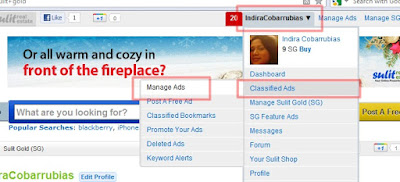
6. Click "Manage Ads"


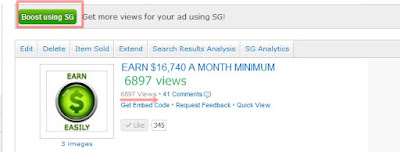
7. Choose the ads you want to boost exposure then click Boost using SG
NOTE: I suggest don't use the generic ads but make a personalized ads so you will be having more exposure.

Note: Try to see how many views this ads have achieved just because of sulit gold. That's the reason marami kyo mainvite the many views it would have, the many the inquiries that you will have too. You can't get this in free ads.

8. Now you have two options:

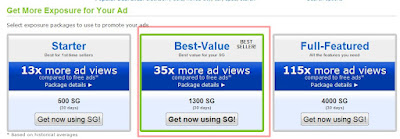
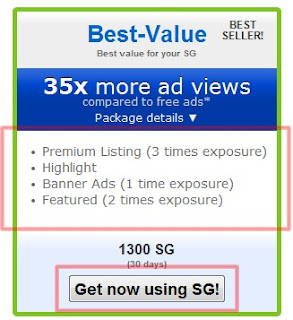
a. Best Value -- Best Seller 

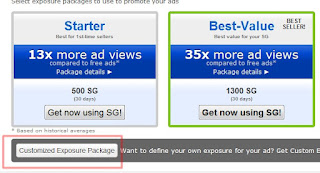
b. Customized Exposure Package

Which is better? Of course it would be the 1st option because with the 1st it cost only 1300 Php on the customized the same feauture will cost around 2018 Php. So I suggest choosing the 1st option.

9. Now click "Get now using SG"

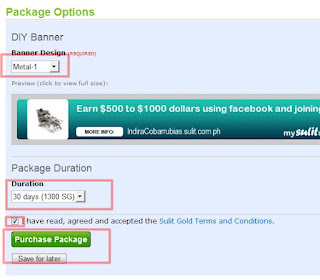
10. Then you can choose your own banner design the no of days of exposure and check the box .
11. Click Purchase Package and just proceed to the following instructions.

12. DONE

13. Now always log in to your account to check for any comments and messages and reply to it. Let them add you up in Facebook and add them to the Group so the Group may help you in convincing your invites.

Since we are one team we could help each other by putting a comment on each others ads the more comment the more legit it will look to the viewers. Marami kasi gusto maverify ung ads through the comments makita nila na ok ung business then they will inquire and join. So ask for the Million Dollars team to comment on your ads specially your uplines.

Share It Coz You Like It

Related Posts Plugin for WordPress, Blogger...
Twitter Delicious Facebook Digg Stumbleupon Favorites More

 
Design by Free WordPress Themes | Bloggerized by Lasantha - Premium Blogger Themes | Blogger Templates